
Analyze frames
Before you stack, find the frames that would hurt the result: a passing cloud, haze, wind, a tracking error, a bright sky at dawn. Step 2 Analyze measures every light, marks the ones that stand out against the others and tells you why. Siderea only marks. You decide which frames stay in the stack.
Open the step with Analyze in the step bar, with ⌥⌘2 or with File → Review Frames… (⇧⌘R). The step fills the whole window, like Frames and Stack. The first time you open it, Siderea starts measuring the lights that have no measurement yet; see Measurements are stored.
The step has a bar on top, the night chart below it, and under the chart the table of lights next to the preview of the shown frame. Drag the lines between them to give one more room.
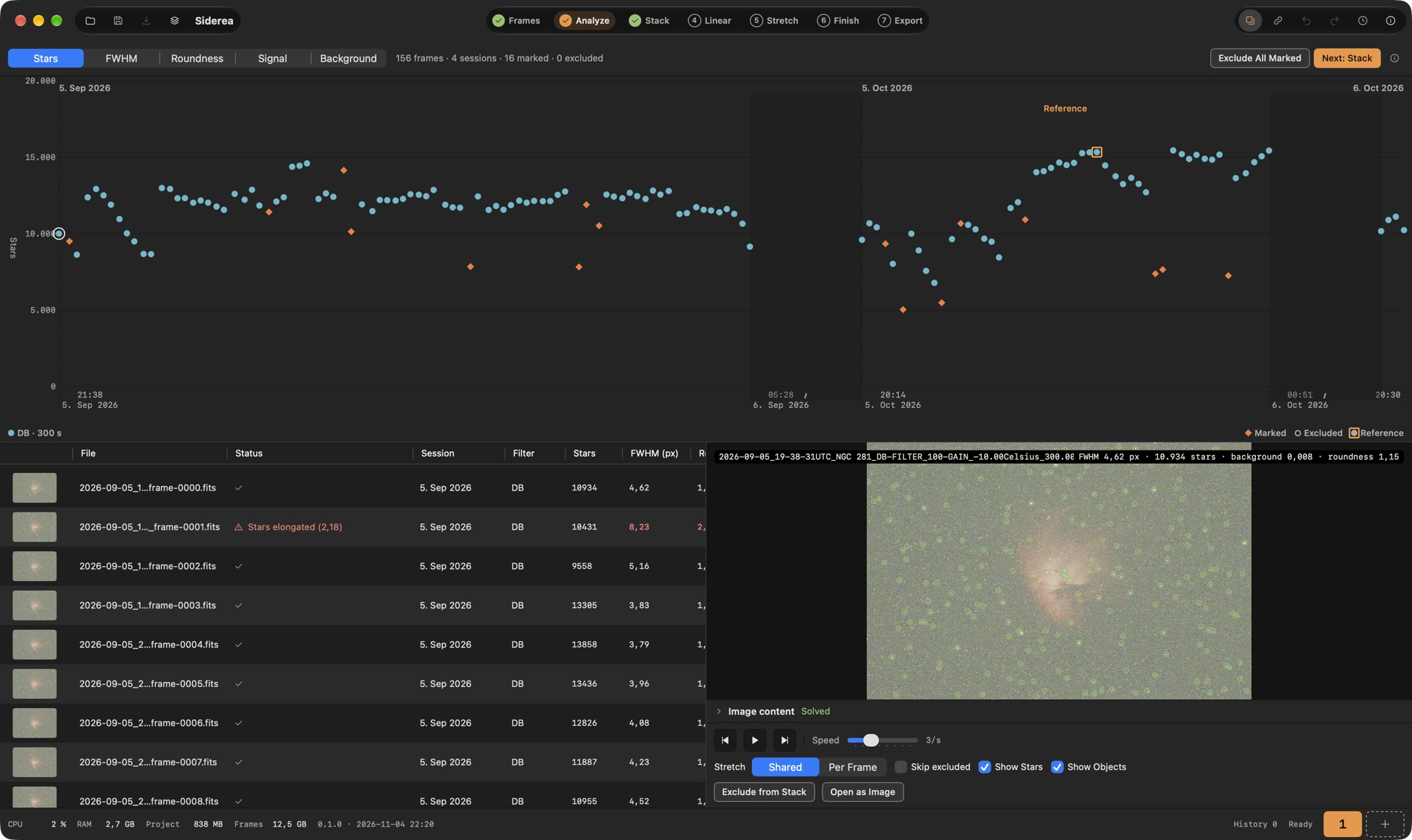
The bar on top has the metric of the chart (Stars, FWHM, Roundness, Signal, Background), the counts of what the table shows, such as "48 frames · 1 session · 3 marked · 1 excluded", the progress of a running analysis (Analyzing 12 of 48), Exclude All Marked and Next: Stack. When the table shows only some frames you selected, Show All appears next to the counts.
What is measured
Only lights are measured; flats, darks and bias never. Siderea measures the frame as it is in the file, at full size and with no master applied. A single-color mosaic from a color camera is debayered first, after its hot pixels were corrected, so a stuck pixel does not pass for a sharp star. The Bayer pattern is the one in the file, or the one you chose under Bayer pattern in the settings of the Stack step, which wins over the file exactly as it does when stacking: a mono FITS file without a pattern is measured as the stack will see it. Changing the choice measures the lights again.
| Value | What it is | What it reveals |
|---|---|---|
| Stars | How many stars were found. There is no upper limit. | Clouds, haze, bad focus |
| FWHM | The median width of the 200 brightest stars, in pixels of the frame. The Stack step shows another FWHM for its reference frame, labelled FWHM (alignment stars): that one is measured on the calibrated frame and only on round stars, so the two numbers are not comparable. | Seeing, focus, wind |
| Roundness | The median ratio of the long to the short axis of the bright stars; 1.0 is perfectly round. Only stars with a good signal-to-noise ratio count, and a frame needs at least 10 of them, otherwise it shows a dash. | Wind, tracking errors, tilt |
| Signal | The median brightness of the 200 brightest stars. The table and the chart show it as a share of the median of the frame's group. | Clouds, haze, dew |
| Background | The median brightness of the sky, 0 to 1 (the mean over the color channels). | Moon, dawn, light pollution, clouds |
Each frame also gets a Score. It rises with more stars and more signal and falls with wider stars, less round stars and a brighter sky. A very small FWHM does not raise it further: under haze a small FWHM comes from noise, not from sharp stars. A frame without stars scores 0. The score is only meant for comparing the frames of one group; it sorts the table and picks the stack's reference frame.
How frames are compared
A frame is judged against the other lights with the same filter (ignoring case and blanks) and the same exposure time. This group spans all sessions: a hazy night stands out against the clear nights taken before it, instead of being the only measure of itself. Lights without a filter or exposure time form groups of their own.
The group's median is taken over all measured frames of the group, also the ones you excluded or keep anyway. Excluding a frame therefore never moves the median and never marks another frame.
Frames are marked from three measured frames in a group on. With fewer, the values are shown and the score exists, but nothing is marked, because there is nothing to compare with.
When a frame is marked
A frame is marked when a value is beyond its limit. A value exactly at the limit does not mark.
| Value | Marked when | Reason in the status column |
|---|---|---|
| Stars | fewer than half the median | only 11 % of the stars |
| FWHM | more than 1.5 times the median | FWHM 40 % above the median |
| Roundness | above 1.3 and more than 1.2 times the group's median roundness | Stars elongated (1.46) |
| Signal | less than half the median | Signal 96 % below the median |
| Background | more than 1.5 times the median | Background 60 % above the median |
The second condition for roundness keeps a group that is oval as a whole (optics, a tilted sensor) from marking every frame. A frame in which no star was found at all reads only 0 % of the stars.
Several values can apply to one frame. The status column shows the worst reason; the tooltip lists all of them. The numbers that mark a frame are drawn in red and bold in the table.
Exclude All Marked and Keep Anyway
Nothing is excluded by itself.
- Exclude from Stack (press X in the table or the preview, ⌘E, or use the context menu) leaves the shown or selected frames out of the stack; Include in Stack takes them back. An excluded frame stays in its group and in the project, the file is never touched.
- Exclude All Marked leaves out all frames that are marked and still in the stack, in one go. It never touches a frame you keep anyway.
- Keep Anyway (context menu, or the button below the preview) says: this frame is marked, but I want it. Its status reads Kept anyway, its values stay visible, and Exclude All Marked leaves it alone. Remove Keep takes the decision back. Siderea saves the choice with the project (Save), and it survives a new measurement of the frame.
The night chart
The chart shows one point per measured light over the time it was taken (DATE-OBS), with the metric from the bar on the vertical axis. Stars and Signal start at zero.
- The sessions stand side by side, each starting at a dashed line with its title; the time between two nights is compressed to a small gap, so a night never shrinks to a dot.
- The time axis below the chart labels every unbroken stretch with the time its first and its last frame were taken, in your local time (the project's time zone); the start also names the day, and the end only when it is another day. A shaded band with a ⫽ mark shows where time was cut out between two nights (or after a pause of more than 12 hours inside a session), so you can tell five minutes from three days. A time with a † is the camera clock of a RAW frame, which is not tied to a time zone. When the chart is too narrow, labels that would overlap are left out (first the ends of the nights, then the other starts); the first start and the last end stay as long as they fit. VoiceOver reads the first and last time and the number of breaks with the chart.
- Every group (filter and exposure time, such as DB · 300 s) has its own color and its own shape (circle, square, triangle, inverted triangle, plus), listed in the legend under the chart, so the groups can be told apart without color.
- A marked frame is an orange diamond, an excluded frame the hollow shape of its group. The shown frame has a ring. With Differentiate Without Color on in the system settings (Accessibility → Display), the markers are larger and outlined.
- The reference frame has a square ring and the label Reference on the plot, and an entry in the legend.
- A click on a point shows that frame in the table and the preview.
- Lights without a capture time cannot be placed and are counted under the chart (3 frames without a capture time), and so are the ones that have no value for the metric (a clouded frame without stars has no FWHM).
A cloud shows as a dip in Stars and Signal, wind as a rise in Roundness, dawn as a rise in Background.
The table
One row per light. Click a heading to sort, click again to reverse; frames without a value come last.
| Column | Shows |
|---|---|
| (thumbnail) | A small preview, read when the row comes into view. |
| File, Status | The file name; the status: Excluded, Session excluded, the reason a frame is marked, Kept anyway, a warning of the Checks, or why a file could not be read. |
| Session, Filter | Where the light belongs. |
| Stars, FWHM (px), Roundness, Signal (% of median), Background | The measurements. |
| Score | The score of the frame. |
| Stars (aligned) | The stars the alignment of the last stack found in the full frame; the tooltip has the matched stars and the transform, see Alignment results. |
The context menu of a row works on the selected rows: Exclude from Stack / Include in Stack, Keep Anyway / Remove Keep (only where they apply), Use as Reference and Automatic Reference (see the reference frame), Open as Image. A double click also opens the frame as an image on the canvas and switches to step 4 (Linear).
The preview
A click on a row shows the frame at once, large and stretched like an opened image. The name, its place in the table and its measurements are laid over the picture; Show Stars circles every star that was found, so you see clouds and stretched stars directly, and Show Objects names what the reference frame shows. A red Excluded marks a frame that is left out. Below the preview is the player:
| To … | Do this |
|---|---|
| step through the frames of the table | Press ← and → while the table or the preview has the focus, press ⌘[ and ⌘] anywhere in the step, or use the buttons below the preview. |
| play them | Press Space while the table or the preview has the focus, press ⇧⌘P anywhere in the step, or use the play button. Speed sets 1 to 8 frames per second. |
| leave a frame out of the stack | Press X while the table or the preview has the focus, press ⌘E anywhere in the step, or click Exclude from Stack. Press X again to take it back. |
| skip excluded frames while stepping | Turn on Skip excluded. |
The single keys work while the table or the preview image has the keyboard focus (click one, or press Tab until it has the ring), so they never take a key from the Speed slider or a picker. The menu Frame has the same commands with shortcuts that work anywhere in the step: Previous Frame (⌘[), Next Frame (⌘]), Play / Pause (⇧⌘P) and Exclude from Stack / Include in Stack (⌘E). Stretch → Shared (the default) shows every frame with the stretch of the first light, so a frame darkened by clouds or brightened by the moon looks different. Per Frame stretches each frame on its own; that hides such differences but shows the stars of a faint frame better.
Loupe. Click a spot in the preview, or press and drag, to judge it up close. The loupe follows the pointer while the button is down. A small square marks the spot, and a panel in a corner of the preview, up to 672 pt wide and as large as the pane allows, shows it enlarged from the full-resolution frame, not from the preview, with every pixel as a square. Choose 2×, 4× or 8× in the panel's header (4× is the default; at 2× you see a wide patch around a star, handy to check that stars are round). The loupe stays where you release it until you click somewhere else, click the close button or press Esc. When you step to another frame, the loupe stays at the same spot of the image, so you can compare frames there. While a film plays, the panel keeps the last picture, dimmed, and reads the new frame when you pause. The panel moves to another corner (bottom ones first) when the marked spot would be under it. At 2× the panel can hold several stars at once. The Stars | Preview switch in the panel's header chooses how the crop is drawn. Stars (the default) is made to judge star shapes: hot pixels are corrected like in the analysis, the picture is brightness only, and the stretch is made for the spot, with the sky dark and the brightest star's core white, so noise and color speckles do not distract. Preview shows the colors with the stretch of the preview.
Without a pointer: View → Loupe at Center (⌥⌘L) puts the loupe in the middle of the frame, and View → Move Loupe (⌥ and an arrow key) moves it by a quarter of the region it shows; the step is smaller at 8× than at 2×. The commands work while the Analyze step shows a frame.
In the Frames step, Review Selected Frames in the context menu opens this step with only the selected lights in the table.
What is in the image
Siderea can tell you where the reference frame points and what it shows: it solves the frame against the sky catalogs on your Mac (plate solving), without an internet connection and without a program such as ASTAP. Only the reference frame is solved, and when you choose another one the new one is solved (or its stored answer is read).
Solving. As soon as the analysis has measured all lights (or at once, if you chose the reference yourself), Siderea matches the brightest stars of the reference frame with the star catalog. Nothing needs to be entered: the pointing, focal length and pixel size from the file's header make it faster if they are there, and without them Siderea searches the whole sky, which takes a few seconds longer the first time. The ring in the Image content panel shows the progress, and Cancel stops it. The answer is stored with the measurements in cache/analysis (and kept by Clear Cache), so opening the project does not solve again. A frame that could not be solved is stored too, so Siderea does not try it again on every start; Try Again does.
What can be solved. The star catalog goes down to magnitude 11. Siderea needs about 30 catalog stars in the frame, which means a field of about 1° × 0.7° or more in an average part of the sky; a smaller field (a long focal length, a small sensor) usually does not solve. A frame with fewer than 8 stars, or with stars too blurred to measure, does not either. The panel then says Not found and why: Not enough stars found, No match in the catalog or Timed out. Type the focal length and the sensor's pixel size (the camera's, without binning) and press Try Again to give the solver a good starting point; they are stored with the answer.
Show Objects. Next to Show Stars. It is off until the reference frame is solved, and says why while it is off (tooltip and VoiceOver). It is switched on by itself the first time a frame is solved in a session. It draws, on the reference frame only:
- deep-sky objects (galaxies, nebulae, clusters) as outlines with the size, axis ratio and angle from the catalog, with name and designation, for example M 42 · Orionnebel or NGC 1977; an object too small for an outline is a cross; an object without a known angle is a circle of its mean size;
- stars with an official name, with a small ring and the name and designation, for example Alnitak · ζ Ori.
Names follow the app's language (the German name where there is one). To keep a crowded field readable, Siderea lists objects with a Messier number or a common name and the others down to magnitude 14 (if the magnitude is unknown, from 3′ in size; objects that fill at least a tenth of the field are always listed), at most 60 objects and 20 stars, the most prominent first. Labels keep their size at every window size, move out of each other's way (right of the marker, then left, above, below) and stay inside the picture; a label that finds no free place is left out, the least important first. The markers are decoration for VoiceOver; the list in the panel is the accessible way to the same information.
Image content. The collapsible panel under the preview shows the status (Not solved, Solving…, Solved, Not found – reason) and, for a solved frame:
| Center | right ascension and declination of the middle of the image |
| Field | the size of the picture on the sky, for example 2.7° × 1.8° |
| Rotation | where north is: North is up, or the angle it is turned clockwise or counterclockwise; Mirrored if the picture is a mirror image of the sky |
| Pixel scale | arcseconds per pixel |
| Solution | how many stars matched and how closely |
Below that is the list of objects and named stars in the picture, the most prominent first, with type, magnitude and apparent size. Choosing a row emphasises the object in the preview (and shows the reference frame, if another one is shown); an open loupe jumps to it. The list can be used with the keyboard and with VoiceOver, which reads each row as a sentence and announces the choice.
The catalog data are listed under Catalog data. The constellation is not shown yet.
What the stack takes from it. When the reference frame is solved, the stack carries its world coordinates in the header, and the frame report names the field. Siderea only reads the stored answer for this; a stack never solves anything by itself, so solve the reference frame here first. A frame whose answer is missing, failed or no longer valid (the file or the Bayer override changed) gives a stack without coordinates.
Measurements are stored
Siderea keeps the measurements in the project, in cache/analysis, one small file per frame. A frame is measured again only when it is new or when its file changed (path, date of modification or size). Opening a project never measures a frame again, and Clear Cache in the Stack step keeps the measurements: they take minutes to make.
The measuring runs in the background, two frames at a time, and goes on when you open another step. The ring around the number of step 2 in the step bar shows its progress, and a check mark appears when every light in the stack has a measurement. Frames you add later are measured when you open the step.
The reference frame of the stack
All lights are aligned onto one reference frame, and a poor reference spoils the whole stack. With Reference frame → Automatic, the stack takes it from the analysis: the light with the highest score among the lights in the stack, from the filter with the most lights and, inside it, from the exposure time with the most lights. A light that is marked is only taken when every candidate is marked, or when you keep it anyway. A reference you choose yourself in the settings always wins.
This step shows which frame that is. The reference carries a Reference badge (a star and the word) in the table, in the night chart and in the header of the preview; VoiceOver adds whether you chose it or the stack picks it. Before any light is measured there is no automatic reference to show. To choose another one, open the context menu of a light and pick Use as Reference; it is only offered for a measured light that is in the stack, and a light that cannot be chosen says why. Automatic Reference goes back to the analysis' choice. This is the same setting as Reference frame in the Stack step, not a second one: what you pick here appears there, and the other way round. A chosen frame that you leave out of the stack counts as not chosen (the Stack step shows Automatic for it) until you include it again.
If lights have no measurement when you start the stack, its progress list begins with the step Analyze. It measures only the missing frames, with the same stored results as this step, and waits for the frames this step is measuring instead of measuring them twice. When everything is measured it finishes at once.
Catalog data for the plate solver
Siderea ships three sky catalogs inside the app, so that finding out where a frame points needs no internet connection. The Analyze step uses them to solve the reference frame and to name what is in it.
| Catalog | Content | Source | Licence |
|---|---|---|---|
| Stars | about 946,000 stars down to magnitude 11, position and brightness | Tycho-2 (Høg et al. 2000, A&A 355, L27), from the ESA Hipparcos and Tycho mission, provided by CDS | free to use with the citation |
| Deep-sky objects | about 12,600 galaxies, nebulae and clusters (all Messier, NGC and IC objects) with type, size and name, English and German names | OpenNGC by Mattia Verga, German names added by Siderea | CC BY-SA 4.0 |
| Star names | about 450 stars with an official name and their Bayer or Flamsteed designation | IAU Catalog of Star Names, IAU Working Group on Star Names | CC BY |
The deep-sky file is an adaptation of OpenNGC and is shared under the same licence, CC BY-SA 4.0, with the attribution above. That applies to the data file, not to the program. Where a common German name exists (Orionnebel, Andromedagalaxie) the German app shows it, otherwise the catalog designation. The files are built from the original catalogs with a tool in the project's scripts/build-catalog folder; the full licence texts are in the package resource CATALOG-LICENSES.md.